My home network observes bedtime with OpenBSD and pf
Back to my OpenBSD pages.
The files mentioned in this article are available for viewing or cloning here: the 'pf-bedtime' repo.
Goals
-
I want my home network to "shut off Internet access" when it’s bedtime.
-
I need it to be completely automatic and on a schedule.
-
I also need to make exceptions to allow a couple servers and devices do backups and updates at night.
-
Bonus: I’d like to be in charge of the DNS on my local network so I can experiment with using it as a DNS sinkhole (like Pi-hole) for unwanted domains and giving my home computers nice local domain names.
To do this, I’m setting up a computer to act as the main router between my ISP and my home network. It performs all of the DHCP, NAT, DNS caching, and "firewall" functions you’d expect from a consumer device, but on familiar PC hardware.
This machine will replace a Ubiquiti UniFi Security Gateway USG-3P. That device worked fine as a plug-and-play router/gateway/firewall and there may even have been some way to get all of this working by shelling into it and hacking a solution. But if I’m going to put in the effort, I’d much rather learn something non-proprietary. I’d rather learn some more OpenBSD.
Update: Martin Stensgård (mastensg.net) kind of blew my mind by telling me that OpenBSD supports the (MIPS of all things!) chip in the UniFi SG: https://www.openbsd.org/octeon.html I had no idea and it hadn’t even occurred to me to look.
The computer
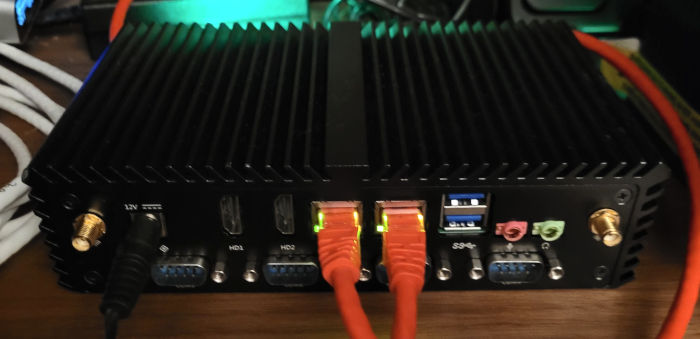
(Fun fact: Initially, when I first wrote this article, I had it all set up on the mini PC featured in this article about my home computing setup. However, I ran into trouble with the RealTek ethernet hardware support in OpenBSD, which had been running fine with Linux for years. So I grit my teeth and bought a replacement, the computer in the picture above. It’s a slightly larger box, but the important difference is that it boasts Intel ethernet hardware, which works great on both Linux and OpenBSD.)
A router is just a computer with at least two ethernet ports and the right software. You can turn just about any computer into a router. By running an operating system you already understand, you have a chance of understanding your router. I like understanding things.
The computer is a Qotom Q305p 3205u. It runs a 1.5Ghz Celeron processor with completely passive cooling (the whole computer is a heatsink), 4Gb RAM, and two gigabit ethernet ports. This one came with a 32Gb SSD, which may be standard for the model. Good specs for a router. Well, probably overkill, but I figure this computer will be useful for many years to come. I have no idea how old it is or what it was used for before I bought it.
(Like my other fanless mini computer, this one has a boat-load of serial DE-9 ("COM") ports. These computers are often used for industrial control, embedded kiosks, and always-on digital signs. The industrial intent and lack of moving parts always gives me the feeling that these computers generally operate for a very long time.)
Total price with power adaptor: $60. I think that’s a great value. I love these little computers.
OpenBSD basic router setup
First, I installed the current stable version of OpenBSD:
$ uname -a
OpenBSD treebeard.local 7.8 GENERIC.MP#54 amd64
I’ve been learning OpenBSD off and on for a couple years. It’s slowly becoming familiar to me. There’s a half-kidding joke about installing OpenBSD being just a bunch of hitting the Enter key. I’m pretty much at that point now that I understand what the defaults are doing. (Such as: No, the install media is not mounted when it asks, but it’ll find it for you and mount it if you hit Enter some more.)
To get the rest of the router setup working, I followed the OpenBSD Handbook’s excellent guide: Build a Simple Router and Firewall (openbsdhandbook.com).
That’s a surprisingly short page that sets up all the following functionality:
-
IP forwarding (kernel setting via
sysctl) -
Two configured network interfaces
-
DHCP services via
dhcpd -
DNS caching for the local network via
unbound -
NAT (IPv4 address translation) via
pf -
Sane minimal packet filtering (the "firewall" part) via
pf
Later, I set up some DNS entries for my home computers, see my related page: Setting up .home.arpa names with OpenBSD’s unbound.
I ended up re-writing my pf.conf completely from scratch
by following The Book of PF. That’s the next section.
Setting up pf

(Sketchbook ink and watercolor by the author: A fearsome Puffy determines which packets shall pass.)
The centerpiece of my setup is the pf packet filter, which is built into
the OpenBSD kernel and originated, like many good things, from OpenBSD.
The bulk of pf configuration is done through /etc/pf.conf.
I constructed mine from scratch while reading The Book of PF, 4th Ed. (see the references section at the bottom of this page).
You can view my full conf in the repo here: pf.conf.
(I like to thoroughly document things I won’t be touching frequently, so there are a lot of comments in that file, including instructions on updating pf after I make changes.)
Anyway, I set this up in the recommended fashion: block all
traffic and then let only selected traffic through.
When it’s daytime, I use the rule:
pass proto tcp from <leased_ips>
When it’s bedtime, that rule changes to:
pass proto tcp from <bedtime_exempt>
There are two IP address tables being used:
-
<leased_ips>is maintained bydhcpdwhen it leases addresses to clients on the local network. -
<bedtime_exempt>is maintained manually by me. I store the addresses in a text file and load them into the table with a script whenever I make a change.
When it’s bedtime, I only explicitly allow traffic to the exempt computers.
This blocks traffic to everything else because, as you may recall, the default
is block all!
You’ll notice that I’m only doing this for TCP traffic. I’m handling ICMP and UDP packets in a strict fashion in accordance with the wisdom of the book. We’ll see if I end up needing to make any exceptions.
(Update: Sure enough, I’m going to need to experiment with the daytime rule - the above doesn’t allow Discord voice chat or Roblox to function, which…was not appreciated by certain members of this house.)
Updating tables
Since this is all predicated on the two address tables, how do these tables get updated?
The <leased_ips> table is initially created in pf.conf with this placeholder:
table <leased_ips> persist counters
It is populated automatically by dhcpd from this command line option
set in /etc/rc.conf.local (also in the repo):
dhcpd_flags="-L leased_ips"
I think it’s great how tables are built right into the OpenBSD kernel and all the tooling understands them. It feels very cohesive and, dare I say it, planned and thought-out?
I store the <bedtime_exempt> addresses in a text file and update the table
from the file contents with pfctl:
pfctl -t bedtime_exempt -T replace -f no_bedtime.txt
The text file is a simple list with one address per line. It can also have standard Unix-style comments (line starts with '#'). Again, all of this feels very cohesive and flexible to me. It’s the good parts of the Unix Philosophy.
When you or a program update a table, the changes take place immediately in the running kernel’s tables and you don’t have to tell pf about them.
Anchors
The crux of bedtime enforcement is the ability to schedule a change to the rules that allow traffic from local computers.
Anchors are a grouping for rules in pf.conf. There are a couple
different uses for them, but in my case, I’m using an anchor as a
named chunk of rules which I can change from the
command line without having to reload anything else.
Initializing an anchor can be as simple as giving it a name:
anchor foo;
In my case, I’m pre-populating my 'bedtime' anchor with the unrestricted Internet access rule so access works when pf starts up with the assumption that it’s currently "daytime":
anchor bedtime {
        # the default "awake" rule, bedtime not enforced
        pass proto tcp from <leased_ips>
}
Once you have an anchor, you can swap out its rules on the fly (they’ll be
parsed and added to the ruleset) from a file or even STDIN at the command line.
Here’s an example that uses echo to replace the rules of a 'foo' anchor:
echo "block all" | pfctl -a foo -f -
As soon as you replace an anchor’s rules, pf will start using them immediately.
By the way, if you made a mistake and have a syntax error in the rules you’re trying to load into an anchor, you’ll just get a syntax error and the rule won’t be loaded. Nothing bad happens and everything keeps running.
Kill active connections in the state table
One of the hardest problems I ran into was the fact that by default, pf keeps track of active connections and stores them in a state table. It keeps these connections alive even if a new rule would have forbidden it.
This is normally desirable for two reasons:
-
pf doesn’t have to expend cycles examining each packet that follows in the same connection.
-
It keeps existing connections (like SSH sessions!) alive even when rules change or address tables update.
However, in my case, I want bedtime to cut off traffic, especially long-lived connections like YouTube streams!
So when bedtime starts and I change the anchor rules, I’m also
killing connections on the local network with pfctl:
pfctl -k 10.0.0.0/24
(Ideally, I would be able to kill connection states for only the entries in
<leased_ips> minus the entries in <bedtime_exempt>. But I’ll admit, after
reading the man pages front-and-back, searching the wasteland that is the
modern Web, and even diving into the source code, I don’t see an easy way to do
that. One possible avenue would be to use the ability to label pf rules and
then kill connections by label, so maybe I can figure out how to craft a
'match' rule that uses the tables to get the correct list of connections to
kill? It’s that or figure out the difference of the two tables in my script,
which…no thanks.)
Update: Adrian Kjær Dalhaug was the first of several pf-savvy people to point out that using a network range would make it possible to do a clean "kill" on specific devices. Adrian writes:
If you split your network range so that the bedtime exceptions for example
could be addressed in the range
10.0.0.0-10.0.0.127 (CIDR 10.0.0.0/25),
and the other DHCP clients in the range
10.0.0.0-10.0.0.255 (CIDR 10.0.0.128/25),
then you can kill active connections only from the latter subnet:
pfctl -k 10.0.0.128/25
From a subnet standpoint, you’d only have a single subnet 10.0.0.0/24, but
you simply choose to assign the individual client addresses in their own
ranges. This won’t affect the routing, as it’s only an administrative choice.
The bonus is that you can target those two different ranges easily in the pf
rules and with pfctl -k. The downside is that moving a client from or to the
exception list, will require a renumbering of that client. (Not that big of a
deal if you utilize DNS extensively).
My 'bedtime' script

(Sketchbook pencil and watercolor drawing by the author: Puffy putting computing devices to sleep.)
All of the above functionality is in a shell script called 'bedtime', which you can view in the repo: bedtime source.
The script has four main modes invoked with sub-commands:
-
"bedtime enforce"updates the rule anchor to disallow most traffic and kills current connections. -
"bedtime lift"updates the rule anchor to allow all traffic. -
"bedtime update-table"updates the<bedtime_exempt>table from a 'no_bedtime.txt' file. -
"bedtime"(no sub-command) displays related information like the current anchor rules and table contents
Here’s what the default information view looks like:
    treebeard:~$ doas bedtime

    -----------------------------------------------------
    Number of <leased_ips> entries:       24
    Use 'bedtime ls' to list leased IPs.
    See also 'less /var/db/dhcpd.leases'

    <bedtime_exempt> table
    To update:
      * edit: no_bedtime.txt
      * run:  bedtime update-table
    -----------------------------------------------------
       10.0.0.144
    -----------------------------------------------------

    Current 'bedtime' anchor rules:
    To change:
      * bedtime enforce    enact bedtime (no internet!)
      * bedtime lift       stop bedtime (internet back)
    -----------------------------------------------------
	pass from <leased_ips>
    -----------------------------------------------------

    Other commands:
      pfctl -sr               show pf rules
I’m really happy with this script. It gives me everything I want to know at a glance and reminds me how to accomplish other tasks.
With any luck, I won’t log into this computer very often, so I’m not going to remember how anything works. I like giving my future self as much help as possible. In my experience, that always pays off and I’ll thank me later.
Cron schedule
Automating the schedule is the easiest part. I just need two entries
in the cron table:
$ crontab -l
# Bedtime routines!
30      22      *       *       *       /home/dave/bedtime enforce
30      5       *       *       *       /home/dave/bedtime lift
Cron entries are one of those baffling formats I have to look up every time, but this creates the following schedule:
-
Every day at 05:30, lift the bedtime restriction
-
Every day at 22:30, enforce the bedtime restriction
Backing it up
One thing I’ve often strugged with for projects like this is how to back up all of my carefully crafted settings when they’re scattered all over the filesystem.
The answer I came up with is also in the repo, a short ksh script called update-repo.sh.
It’s mostly a series of cp statements to copy the related files from
their various locations to the repo
(and a chmod and chown make them accessible to my regular user
account). It also dumps the current crontab.
After making changes, I cd to the Git repo in my
home directory and run this script. Then commit the changes
and push them to my home server (also now running OpenBSD -
article pending!). Since the repos on my home server are
fully backed up, my configuration is backed up well. Nice!
In addition to its basic function, the update-repo.sh script serves as a
handy index for which files are involved and where they go. If I had to, I
could use it to reverse the process and populate the computer configuration
from the repo.
Update: In fact, that’s exactly what I did when I had to switch computers as described at the beginning of this page. This backup solution is tested!
Resources
Here’s what I referenced (often multiple times) while setting this up:
-
The OpenBSD Handbook (openbsdhandbook.com)
-
The Book of PF, 4th Edition (2026) (nostarch.com) by Peter N. M. Hansteen
-
Absolute OpenBSD, 2nd Edition (2013) (nostarch.com) by Michael W. Lucas (re-read relevant portions to understand the overarching networking abilities of OpenBSD)
-
man pf.conf (openbsd.org)
-
man pfctl (openbsd.org)